Speaker 0 00:00:00 Digital marketing is more important than ever. And for a lot of people, it feels like it takes a lot of time. And in today's conversation, we wanna share with you six tips that we've picked up to help you save time when it comes to digital marketing. We hope this conversation helps you reach more people and grow. You're listening to The Reach Right podcast, the show dedicated to helping pastors and church leaders reach people the right way. Hosted by me, Thomas Costello, And with me as always, is my co-host, Ian Hyatt. We're here to help your church see more visitors and grow
Speaker 2 00:00:46 To get ready to get
Speaker 0 00:00:51 Well. Hey guys, welcome to the Reach Ride podcast. I'm your host Thomas Costello. And with me as always is my co-host
Speaker 3 00:00:58 Ian Hyatt. What's up, Thomas?
Speaker 0 00:01:00 Hey, not much man. Excited to talk. Today. We're gonna be talking about a good topic. It's six digital marketing tips that are gonna help our listeners and watchers help them save time. That's what it's all about here for us today. And so I think it should be a fun conversation for us to go through, uh, some of those ideas and things that we've picked up along the way that really, uh, streamline our marketing. Yeah. So of course you and I, we run a digital marketing firm. Yep. We help churches and, uh, some non-profits and a few businesses. We help them do digital marketing. Uh, and if we just kind of just did our best whenever it seemed right and didn't really have plans and things to Yeah, in place, like a hacks like this, we would be, um, but we, we'd be on the road to nowhere. So yeah, we picked up some things along the way that helps us to save time. We wanna pass along some of that insight and hopefully it helps some of our audience save some time too. So, yeah. Sound good?
Speaker 3 00:01:53 Sounds great. Everyone's about saving time these days. We know churches are busy with everything that they have going on and, uh, definitely a good thing. So,
Speaker 0 00:02:02 Yeah. Agreed. So, cool. Well, yeah, let's, uh, let's dig into it, I guess.
Speaker 3 00:02:06 Yeah. First one, uh, create branding guidelines for your digital marketing strategy, branding guidelines, Thomas, Those gotta be important, right?
Speaker 0 00:02:16 Yeah, they are. Um, I think that this is something that a lot of churches, they tend to miss this idea. Uh, so what I see so many churches do is they have just, they have files and files and we'll talk more about this in a little bit of Yeah. Old logos and yeah. They don't really have a game plan when it comes to what fonts they use, and they don't really have specific colors that they always use there. Yeah. They just say, uh, like, how often do we do calls? And they say, Well, we really like blues. Yeah. We also like reds. Yeah. And sometimes oranges. Yeah. And greens are great. Our, we use yellow at one time.
Speaker 3 00:02:52 <laugh>,
Speaker 0 00:02:52 That's our chairs. That's exactly what you hear. Or our sign out front. You know, that it's, So what I'm getting at is that a lot of times, uh, churches do kind of the, uh, the judges' approach when it comes to their branding and they just do, everybody does whatever seems right in their own eyes. Right? Right. They just kind of throw something out there and, and see what sticks. Yep. So we have found that you will, it'll help you immensely and it'll also save time. Yep. Uh, if you really nail your branding guidelines, like, so having a, an official document that everybody on your staff and everybody that's a leader that would do anything related to design, they have access to this document that spells out exactly how we use our logo. Yeah. Exactly. How we, what fonts we use, what fonts we use for headings, what fonts we use for body texts, what weight those fonts are, what size those fonts are, what colors those fonts are.
Speaker 0 00:03:50 Yeah. Exactly what colors we use as a brand. Yeah. Here's what we do. And then here's one of the things that we think is really important with a brandings guideline document is it has to also say what not to do. Here's ways we never use our logo. Here's never ways that we use our fonts. We don't, we never, when we do our logo, we never retack it this way. We never put our name between the two. Right. Uh, we don't use our icon twice or whatever it would be. Just having very clear guidelines drawn up. It's what really makes a difference between, uh, an effective brand and one that is just kind of out there in the open and it's getting changed all the time and not really effective, so. Right. What do you
Speaker 3 00:04:31 Think? No, I think that's spot on. And, and I think, you know, the nature of church is, as you and I know, both having pastored and, uh, and being a part of local church churches, they want everyone involved. But when it comes to branding, everyone's gonna be very subjective. And, and this branding guidelines document, if you really have this down it, we often tell people what we do here, Right Thomas, we say, Let us be your bad guys. Let us be the ones that, that when everyone says, Let's do this or do that over here and no reach, Wright said, We can't do that. Well, the branding guidelines can be your bad guy when someone wants to take something off course or, you know, uh, do something different outside the lines, so to speak. And, and that's a good thing. So you can point to this document cuz it'll keep, again, you, you want a consistent brand, you want things to be done with excellence, so, Agreed. Yeah.
Speaker 0 00:05:24 Yeah. In my experience, it's hard for pastors to look at someone in the eye who just poured their heart out and worked hard on a new design for something like that and say, it's just not good enough, or it's not what we were looking for. Like, it's hard to say that. So if you have these branding guidelines, hopefully they don't even start without like really getting these elements. Right. Here's the fonts to use, here's the sizes, here's the colors, here's the logo. Getting all that stuff dialed in. I think a good branding guidelines document will even have like tone of voice and things that we talk about. So, uh, Amazon for instance, Jeff Bezos is famous for having very specific ways that they communicate in their company. And they say like, you're never allowed to use like an adjective in, in place of a number. So you could, you can't say that lots of people are ordering this product.
Speaker 0 00:06:13 Yeah. You would say that, uh, 5,000,212 people, uh, or so they are ordering this, You use a very specific number. So they, they have very clear guidelines on how they communicate in lots of big companies out there. I think churches should be the same. And the way we communicate and really getting all this stuff nailed down in a branding guidelines document is important here at Reach Rite. Um, we have a very specific one that you have access to, I have access to, and we put so a lot of detail into this. It talks about the way we talk about ourselves and Yeah. Um, whenever we bring someone new on the team, especially in a creative role, we have a new video editor starting, uh, on Tuesday of next week. Yeah. Uh, so he's gonna get this branding guidelines, he'll know exactly how we do things, how we don't do things, and really kind of, it helps you to stay on track and in the end that really saves time because yeah. You are not designing things, you're not doing all this kind of work, you're not doing marketing that you have to just start over on because you have clear ideas of what you will and what you won't do. So that's what it's about.
Speaker 3 00:07:13 Yeah. That's good. Good. Well, the next one, automating your social media posts, how important is that?
Speaker 0 00:07:20 Yeah, Super important. I think that this is a, a huge opportunity for time saving for people. Yeah. Uh, for churches, you're probably posting on Facebook and Instagram. Uh, maybe you're doing, uh, posts on TikTok. Maybe you're putting things on LinkedIn and Twitter. I don't know where you are. Yeah. You're probably, most of us should be on Facebook at Instagram at a minimum. And then anything else is kind of gravy on top of that, I would say. Yeah. But whatever social platforms you're on, their chances are, there are ways you can automate things so that you don't have to be at your computer at that same time every single day or on your phone ready to do it. And you can actually just go about living your life. You can put seven posts all together Yeah. And do 'em all in one day so that they're ready to go out all week long.
Speaker 0 00:08:03 So it really can save you a lot of time. Uh, some of the ones, the one that we use most here is we have, uh, there's one called Buffer. Mm-hmm. <affirmative>, another famous one is called Hootsuite. A lot of times there is software built into your church management software that might do a light version of this, but, um, I speak specifically for Buffer because that's what we use all the time here. Right. Uh, it is something that lets us dial in all of our posts on all of our different channels, uh, so that on Monday we can have the whole week's worth of social media posts out there and ready to go. Yeah. So I will say this though, one word of caution. There are instances where you have to call Audibles on this. So, um, I have seen situations arise even in our own company where a major piece of breaking news comes out, comes out.
Speaker 0 00:08:48 Uh, so, um, I try to remember the last time this happened, a school shooting happens, right? A parkland happened, happened or something like that. If we had a meme ready to go out when the whole conversation on social media is all about this tragedy and people saying their pray for Parkland type things, it's, it's in poor taste. Right? Right. So you have to, it's not just something you can do. I wouldn't recommend you setting up a hundred posts, you know, like just let's get the whole rest of the year done. I don't think that's the right way to do it, because there will come, uh, issues and needs and yeah, things will change there and you will need to have some flexibility here, but just as a baseline, it gets you kind of set up. And here's the great thing. Once whatever happens blows over, or once the change happens, you still have that post, you can just move it to a few days into the future. Yeah. Yeah. And it'll still be valuable to go with in most cases. So I've seen, Yeah, we really love, really
Speaker 3 00:09:40 Love this. Seen people have to apologize, uh, publicly and on social media and explain that they were automating their post. Uh, and you don't want to have to do that either. So <laugh> Yeah,
Speaker 0 00:09:50 Absolutely. No, you're right there. Good.
Speaker 3 00:09:53 Next one. So use a calendar to plan your digital marketing efforts. So what kind of calendar are we talking about?
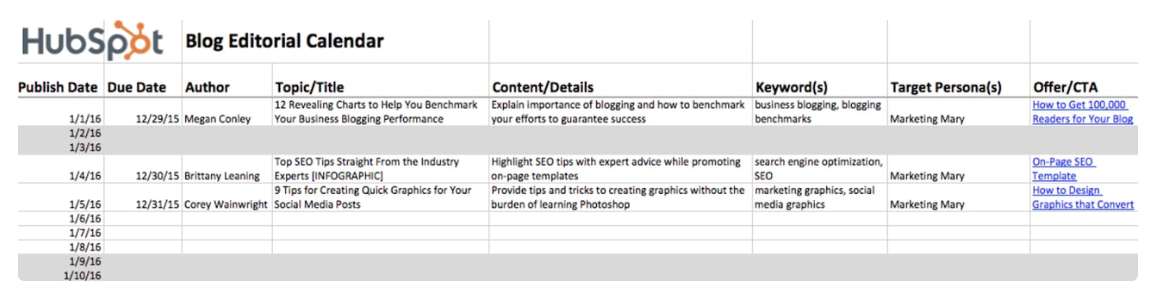
Speaker 0 00:10:01 Uh, you know, it could be anything. I mean, a Google calendar that works a lot. Yeah. Um, I think just, uh, even if it's a spreadsheet, I think that's what we use mostly here, there, I'm sure there are some really great tools that you can use out there to calendarize this. And maybe you have some ideas in that. Here at Reach Rite, we have a spreadsheet in Google Docs that outlines our content marketing calendar. Every week here at Reach Rite, we put out a email that goes out to all of our, our email subscription list. We have this podcast that goes out every week. We have a blog post that we write every week. We refresh three or four different blog posts every single week. Yeah. And so it gets pretty, that's like five different major pieces of content that people spend hours working on.
Speaker 0 00:10:45 Yeah. That happen every single week. It gets kind of crazy. And if you don't have a plan, uh, you'll really, you'll lose control of all this at a really quick right here. So I think it's a big time saver, There's no doubt about that. It does save us a lot of time having this spreadsheet so everybody's on the same page and we know what's going out on which day. Um, I, HubSpot one of the largest content marketing companies out there, they famously just have a spreadsheet that they're putting out all their content on, and the whole company kind of operates on this one spreadsheet when it comes to content publishing side of things here. So that's been really good. And here's what I find is that, so we put a lot of effort into things like keyword research, like, so this particular podcast episode, just to give you guys some, uh, how the, how the cheese is made around here.
Speaker 0 00:11:32 Mm-hmm. <affirmative>, we did a lot of research and found that a lot of you, a lot of our audience are searching for the term digital marketing tips. And so that's why the title of this episode is, uh, six Smart Digital Marketing Tips to Save You Time. Yeah. So we, we've done a lot of research on that, and this helps us to make sure that we're hitting the right keywords when people are searching for these kinds of topics that we know that people are looking for information on digital marketing tips. We have this all in our calendar and we are actually planned out on this. I think our blog posts were planned out through like August of 2023. And just for reference, if you're watching this later, uh, it is right now October of 2022. I think this goes live on November 1st, 2022. So we're planned like nine months in advance on this here because we know the keywords that we want to hit. We know what's important now we're flexible on this. We can, we can make a change if there's some really new important trend that all of our audience seems to be searching for, we can pivot on that. Yeah. But this kind of keeps us organized and it really helps us to get the best results that way too.
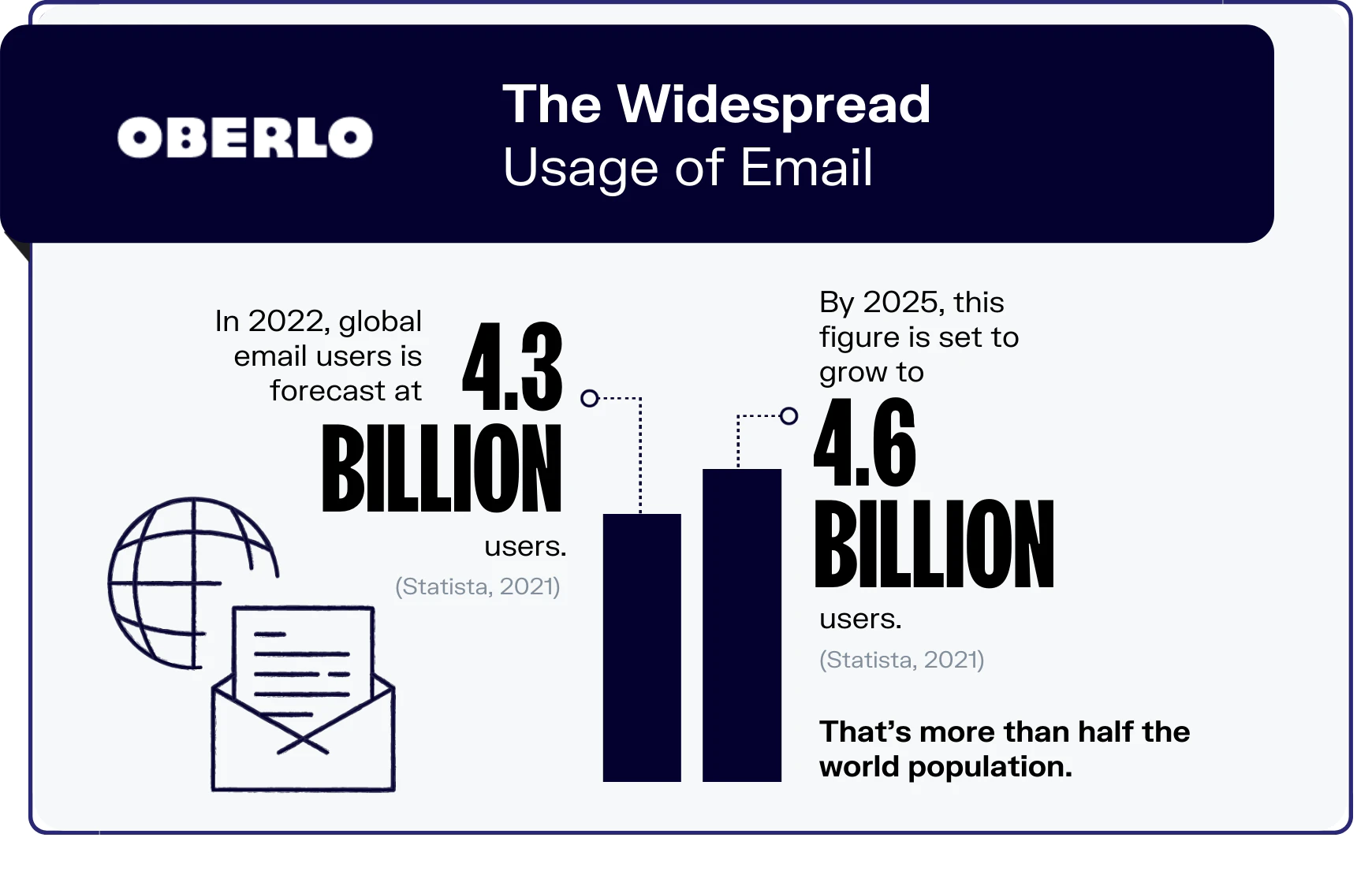
Speaker 3 00:12:36 Yeah. It's really not that tough. It seems almost too simple to, for using a spreadsheet, but, uh, it works. So. Yep. Good deal. Next one, uh, automate your email marketing too. So we're talking about automating social media posts and all of that, so why not email as well, right?
Speaker 0 00:12:53 Yeah, absolutely. Uh, the main way I think that churches can use automated email marketing, I think a lot of us miss, uh, is that we should have email sequences set up when people take certain next steps within our church. The most obvious one is that when someone comes for the first time, if we get their email address, or maybe you have a plan your visit form on the website that people fill out before they come. So someone's coming or just kind of getting introduced to your church, you should have some kind of, what we call in the marketing industry, we call it a nurturing sequence. Hmm. So it helps someone feel and like kind of introduce them to your church, to what makes your church, what it is, what is gonna be in it for them, how you can bless them and their family, those kinds of things.
Speaker 0 00:13:43 And so rather than you just remembering to send that person who came this last Sunday and email, when you think of it, how much better would it be if you had seven really well crafted emails that go to them over the next 30 days? Yeah. That help to introduce them to some of the next steps they can take, uh, some things that they need to know about your church, some what, what they can be doing to kind of get more involved, some of that kind of stuff and really put the emphasis on what you are all about. It really makes an enormous difference. So we do this, I think most marketing firms understand this. So when someone, uh, puts in a lead or maybe you, you watch this episode and if you're watching it on our website over on the right here, you're gonna see a, a form that says, analyze my website.
Speaker 0 00:14:28 If you were to fill something like that out, we would have, we would email you. But you know, again, how the Jesus made, you're not personally emailing every person five times, Ian, when that happens, you're, you're sending, we have a sequence that's set up that does that for us. It's still, here's the, here's the fear. I think a lot of maybe pastors are having with this. They're, they're saying, Well, I don't want it to feel like it's like just a form email. Yeah. Like, it's just going to, it's like, not really from me. Well, it should still be from you. Yeah. You should still be having it come from your email and that's, that's good. But you can personalize it, right? Yeah. It should be set up a good email system now it'll be able to pull in that person's first name. And you wanna, you know, not just leave it all kind of generic, say, Right.
Speaker 0 00:15:12 Hey, you, it was so good that you came to church this weekend or, So, you know, you can, you can find ways to personalize it still and make it feel natural. And we don't wanna trick people. Yeah. We don't want people thinking that, you know, you don't ask, don't say things like, Hey, I wanted you to know I was praying for you specifically. If you're not praying for them by name or if you're not doing that, don't say that. But again, you wanted to feel as natural as possible, but this is just really a huge time saver and I think it actually helps you execute a plan. Yeah. Let's be honest, if you're not using automation, nobody's actually sending seven emails over the first 30 days. Right. Just naturally typing all those kinds of things out Yeah. To each visitor. So Yep. That's what I found.
Speaker 3 00:15:53 Yeah. Not everyone's gonna be interested in responding to your email too. So I think what this also know, that's what frees me up for what I do to reach a ride, is that, you know, hundreds of churches are coming my way. We have to, we have to automate things, but not only that, not everyone's gonna respond, but the people that do well, then you take the time for a personal response. I mean, that's what I, I'm not gonna, if someone responds to the email, I'm not gonna send another automated email, you know, <laugh> that, that can't answer a specific question. So it, you, you hit the nail in the head. You still wanna personalize these, but, uh, they, I think will free you up to also focus on the people that are wanting to connect further, you know, with you and your church. So
Speaker 0 00:16:30 That's good. That's it. One more bonus tip I wanna share on this. So the, the key to all of these emails is every single one of them should have a very specific call to action that it asks them to do. Not seven things. Don't, don't say, Hey, here's 12 ways you can get, uh, more involved at the church. That's a bad email. Yeah. So all of these emails, uh, they should have a very specific call to action. It can be, it doesn't have to be like a fill out, a form call to action. Mm-hmm. <affirmative>, it could be, Hey, I preached a message that, um, is all about what we believe here at Trinity Church. I want you to take a look at it. Here's the link to YouTube. Or, you know, it, it has a very specific goal. So the question to ask on each of these emails is, what do I want this visitor? What do I want them to do as a result of seeing this email? You have a specific goal and you execute on that. That's really, I think, the, the key to these working.
Speaker 3 00:17:21 No, that is a good last, uh, good point. We always end with that Right. Call to action,
Speaker 0 00:17:26 Always end with calls to
Speaker 3 00:17:27 Action into that. So good. Next one is, you may want to consider outsourcing your digital marketing tips and tasks when you don't have the time or expertise. I think that's the, the key there at the end, if you don't have the time and expertise. Right?
Speaker 0 00:17:41 Yep. That's it. So here at Reach, right. Um, we have a business that our, our main function is to help churches reach more people and grow. Right? Yeah. That's why we exist. We wanna help churches reach people the right way. Mm-hmm. <affirmative>. So the way we do that is like 90% of our time is creating content to help you, to help our audience, uh, reach more people and grow like, so this kind of an episode, we want to equip you to do these kinds of things, but the fact is that we know that there is a certain subset of people that just don't have the time, the skill set, the desire to do all of the stuff it takes to do digital marketing and to, to really get these things nailed. Right. So that's kind of what we're baking on our, our company. We wanna help you any way we can, but if you ca if you just don't have the time or ability or the desire to do it, we're here to do that all for you.
Speaker 0 00:18:34 Yep. Uh, so we're a perfect example of that. But there are lots of ways that you can outsource some of these kinds of tests. Mm-hmm. <affirmative>, maybe you don't, you, maybe it's not just services that we offer. Right. There is a lot of people now that are using virtual assistance mm-hmm. <affirmative>, these are oftentimes, uh, people could be here, not necessarily even in your church, but just someone that could help you with some of these regular day-to-day tasks. They could do social media posting for you in some cases and you could hire these people often. You could even find people overseas that could help you with this for very little money. We don't use any virtual assistance here at Reach Rite. We just, uh, we try to bring people in, uh, full-time and and help them and pay them well. Yeah. It's kind of our mo but I have heard of some churches that are doing well with virtual assistants, but I think for most of us, it's gonna be taking an honest look at some of these things and asking yourself this question, is my time as a church leader, as a pastor, whatever your role is, is it best spent doing this?
Speaker 0 00:19:28 Am I good? Am I good enough at this? Is it worth my time to do it? Because here's what we found at Reach Rite is that, um, here, this is a classic example for website edits, right? Yeah. So churches often, uh, and we, we build websites for churches. They can go in there and they can do, they have access to do just about anything that we can do. And the system is super easy that you can do these changes. It's not hard to learn, but when you have a professional do these kinds of things for you, we can do things sometimes in 30 seconds. Right. That might take someone who's just learning the system, it might take them 20 minutes to figure out. Right. Right. So in a lot of ways it makes sense for you to outsource some of this kind of stuff just because it's not worth your time in some cases.
Speaker 0 00:20:12 Yeah. For instance, to write transcripts for each one of your sermons, right? Yeah. If you're not someone who does a, a, a word for word, a transcript of your sermon, you're, it's not worth your time to listen to your sermon and type that out yourself. You'd be better off hiring a service to do this and paying the 20 or $30 that it might cost to do that because it'll save you three hours cuz you're no good at transcribing stuff. Right. So same thing goes for, if you're doing the Google grant, if you're claiming that $10,000 that Google gives to churches every month, like you probably could figure out how to do that. We have people on our team that have figured out at some point they learned how to manage the Google grant, but in most cases it's not worth your 10 hours a week of trying to manage that.
Speaker 0 00:20:55 It's probably best to outsource something like that and have someone else do it. So all of to say you probably in 2023 as we come into this new year. Yeah. It's probably a good time to take a look at your time. Not just your budget for your finances, but your budget for your time as a church leader. Yeah. And think about that question of where is my time best spent and is it worth the $200 a month to outsource this to somebody else? If it saves me 10 hours a week, it probably is. You know, And so it is doing some of those kinds of things there. So those are the questions I think a lot of us pastors have to be asking ourselves.
Speaker 3 00:21:28 Yeah. And I think that's really good. Just, uh, that last point about is it worth this person's time? And we're in an age right now too within the church that there's a lot of value placed on the church communication director. Mm-hmm. <affirmative>, there's more church communication directors these days than ever before. And most that I talked to when they, when they're considering is my time best spent doing all of this? Or is it overseeing it and freeing me up for other projects? Usually that's, uh, a resounding yes. Not always, but, so I think that's a, that's a good point. Asking if it's best served time and usage there. So last but not least here, and this one was weird when I first saw it and interested to hear your thoughts on it, create a system for managing digital assets <laugh>.
Speaker 0 00:22:16 Yeah. It sounds more complicated than it actually is, but I think we've all been in this situation before where, you know, we, we need the church logo, uh, and we have to ask ourselves, okay, where do I find the church logo in the appropriate form, the right size, the right colors, all those kind of things, you know, and you think to yourself like, well let's see. I know that I'll just have to send, uh, the secretary, I'll send her an email real quick. And she says, I'm not really sure, so let me ask the youth pastor. He'll find it. I'm sure. Let's send a message to the youth pastor at email, goes back to them as opposed to a better solution is having a system set up where there is a cloud based service. Probably gonna be one of three things. iCloud, Dropbox or Google Drive, those are the three most common ones you would look at.
Speaker 0 00:23:04 And you have folders set up for all of your digital assets that you need. So this is gonna be everything from your church's HR forms. So things like, uh, expense reimbursement requests, check requests, that kind of stuff. Uh, to all of your design files is where your branding guidelines and your logo files and all those kinds of things go. And then just really any other projects that are being worked on. Uh, or maybe there's flyers that you guys are sending out there, or postcards that you're doing or email newsletter templates, whatever it would be. Having all of these things online in a shared resource. Again, iCloud, Dropbox, Google driver, the most common, having them there like that just saves you tons of time. And I have to go on a goose chase every time you need a file now here, here's, uh, the, the thing is that this stuff has to be worked.
Speaker 0 00:23:55 You have to always be keeping everything current in here. Right. Um, I know right now we're in kind of a pivot of moving from Dropbox onto Google Drive, but let me tell you this, as a web design firm, I gotta tell you, it would be impossible to do our job when we're designing websites as part of what we do. Oh gosh. Yeah. If we had to go on a goose chase every time we needed every single picture logo and all those things for every single one of our clients at any given time, we probably have 50 different clients that are at some phase of the production process, Right. Of their website. If we had to send them an email and they had to send an email back to somebody else on their team every single time they wanted to make a website change or add a new picture or anything like that, we'd be in a world of hurt.
Speaker 0 00:24:38 So what we do is we have a, a folder for each church that we serve and in there there is a folder for logos, a folder for videos, a folder for photography. Yep. A folder for other branding things. And they kind of get that loaded up with all of tho all those digital resources so we can grab what we need when we need it. And it just makes everything work seamlessly on a smaller scale. Churches need to do that in-house there so that you don't get lost in the weeds. This is a huge time saver of not having to send people on all kinds of chases to find the things that you need there.
Speaker 3 00:25:10 Yeah. That's good. Nothing much to add there. Very thorough Thomas. And I would say this though, I guess in closing on on this is that, you know, some pastors or ministry leaders might be thinking, well this is a lot to do. There are some, it is a little bit of work involved, but I I would say once you do this, it's gonna make life a lot easier and free you up for a lot of other things. Yeah. So,
Speaker 0 00:25:32 Yeah, I think a lot of our audience needs to consider that outsourcing part. Yeah. Like, cuz I, I have just, I mean we kind of have a reputation in churches that we, we like to do things in house with volunteers when we can. Yeah.
Speaker 0 00:25:43 Uh, but a lot of times we can't <laugh>. Yeah. That's just if we're being really honest, Right. Cause we have this, like this reputation out there that like, well there's like the quality that businesses or the world does and then there's churches and the quality that they put out mm-hmm. <affirmative>, right? We kind of have this, it's kind of a, a thing we don't have to talk about, but like how often is like a church website the butt of a joke, Right? It's like, oh yeah, it's a church website so it looks that way. Mm-hmm. <affirmative>, it's, it's something that's, this has become so important. You and I have been doing this since 2006. We've been helping churches with this kind of stuff, digital marketing stuff and it's obviously so different now, but my goodness. Like how important it is today compared to what it was back in 2006.
Speaker 0 00:26:25 Yeah. I think in 2006, I mean maybe, uh, maybe 30% of people would've seen you online or Right. Or heard about you first online. Whereas now I can't think of a reason why anybody wouldn't hear about you online before they show up for the first time. So it really is the first impression that people have of your church is your digital marketing. Yeah. If it is embarrassing at all, I think you have a hard thought about that. Yeah. What can we reasonably, what can we afford to, Right. What makes sense for us to kind of give away and find someone to help with this stuff here. So that's the way I'm thinking about it
Speaker 3 00:26:58 And why should we settle with embarrassing? We shouldn't, we should be doing things with excellence to lead people again to what God's doing at the local church level. So Well said.
Speaker 0 00:27:07 That's exactly right. So yeah, I hope this has been helpful. Um, yeah, we want to help you guys and this is about, uh, making, giving you tips to help you save time and just be more effective at digital marketing because yeah, it is that important. Uh, if it has been helpful for you, it would mean a lot to us. If you would rate reviews, subscribe, let us know in the comments. That is one of the biggest things for the algorithm for us is that we find that when people comment, we always respond. Like we have people dedicated to responding to comments. I get in there and respond to comments as well. So if you have a specific question for us, let us know in the comments there. But that is one of the best things for us to help get the word out about this episode. So, uh, anyway, thanks so much for being a part of the Reach Right family and we'll catch you next week.
Speaker 3 00:27:48 See ya.
Speaker 0 00:27:51 Thanks for listening to the Reach Right podcast. We hope this episode will help you reach people the right way. Looking for more resources for your church, check us out
[email protected]. If this episode has been helpful to you, it would mean the world to us if you would rate, review and subscribe on iTunes or wherever you get your podcasts. Thanks again for listening and we'll see you next week.
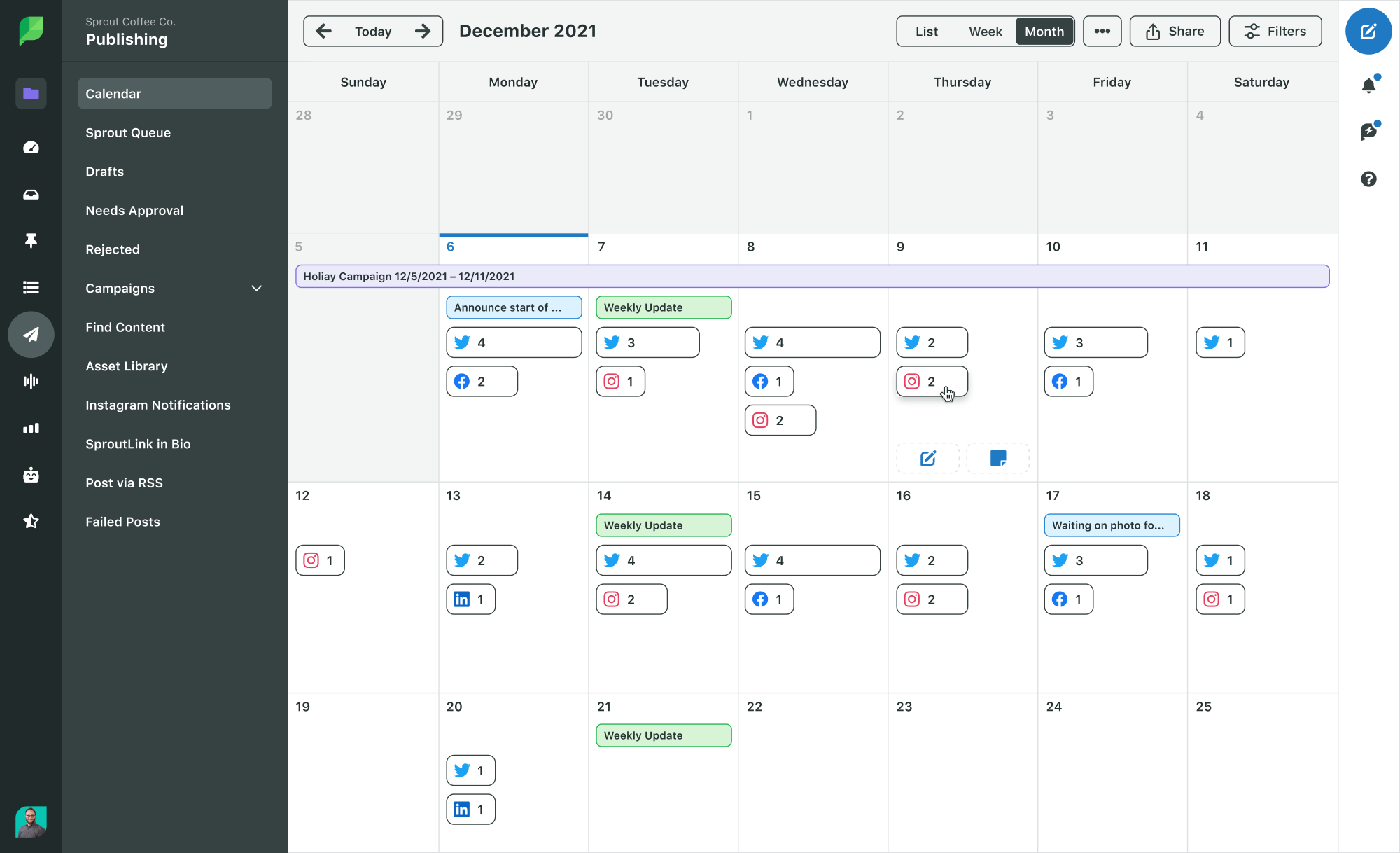 Source: Sprout Social
 Source: HubSpot